Communication flow
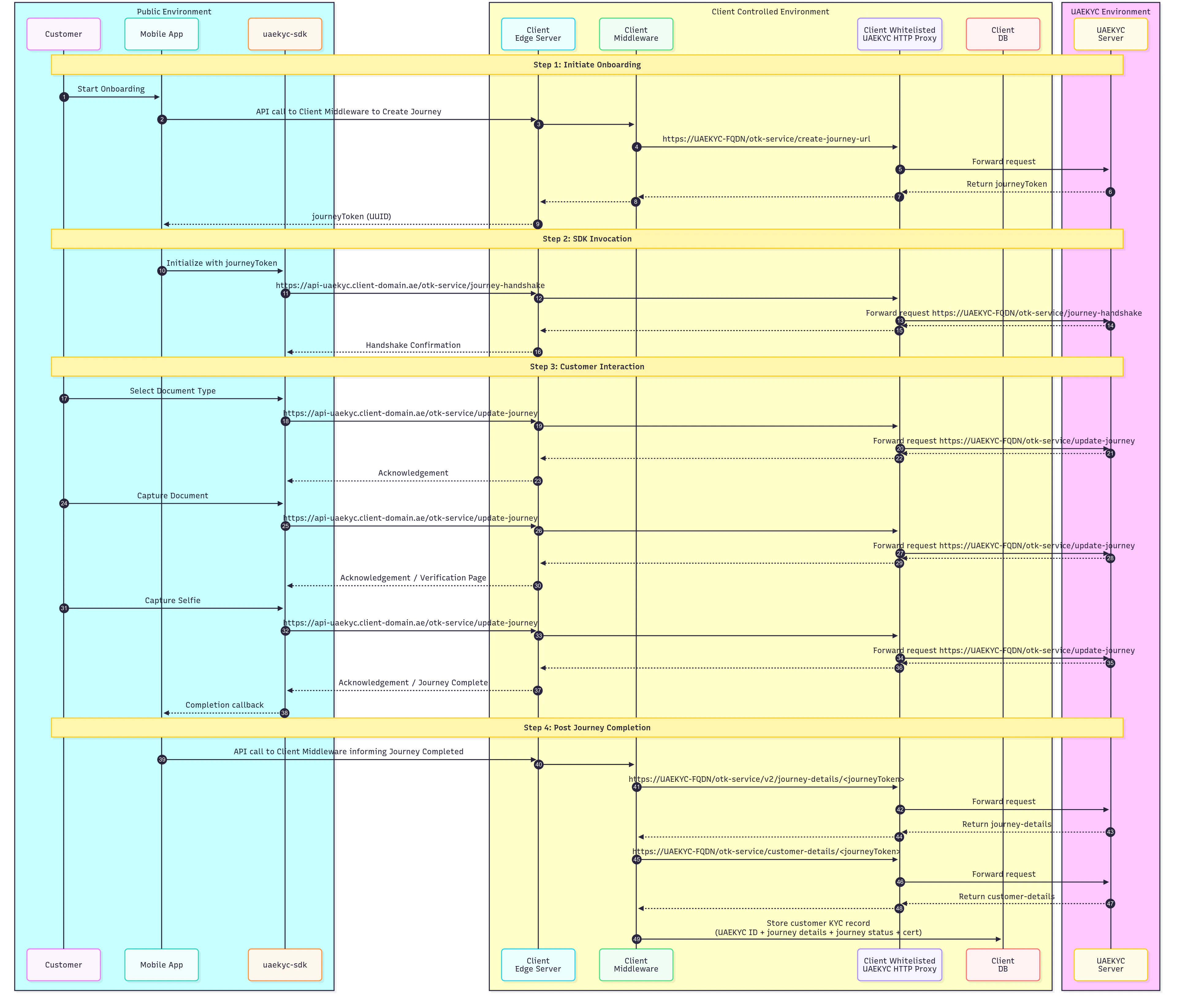
Read more details about actors & communication flow
Authentication & Audit logs
1. Journey Token
- Creation of Journey Token is restricted to client authorized backend system using the
x-transaction-keyheader - Each journey is uniquely identified by a UUID-based Journey Token.
- This token is used to invoke the SDK and establish a secure session.
- All communication between the SDK and the server is conducted using a hashed version of the token, acting as an authentication key to verify requests and protect against unauthorized access.
2. Finite Attempts at Each Journey Step
Document extraction, face capture, and liveness verification steps have a finite number of attempts defined by UAE KYC Team. End-user exceeds the allowed number of attempts, respective journey is automatically terminated to prevent brute-force attempts or excessive retries. Audit Logs: Every step on the SDK is logged, capturing detailed audit logs with timestamps, meta data and user activity allowing traceability and journey replays.3. Short Expiry for Journey Token
SDK cannot be invoked without a Journey Token, each token it valid for 10 mins. If the end-user fails to complete the journey within this time frame, it is marked as abandoned, and further interactions are blocked. This minimizes the risk of token misuse or replay attacks.4. Rate Limit
Each journey enforces granular rate limiting to prevent brute-force attempts, excessive retries, and DoS attacks by restricting requests per step.5. Handshake & Hybrid Encryption
- During Init, SDK and server perform a secure handshake by exchanging public X25519 keys.
- ICP backend system only authenticates onboarding channels that are registered with the system using secure license and package identifiers, such as package name in Android or bundle identifier in iOS.
- Using the Diffie-Hellman key exchange, a shared secret is derived.
- The shared secret is used to generate AES-256-GCM encryption keys, ensuring end-to-end encryption.
- All payloads and responses are encrypted using AES-256-GCM, protecting data integrity and confidentiality.
- MessagePack encoding is applied to enhance performance and resist packet inspection, while ensuring data integrity.
Data Security & Encryption
1. Secure Network Communication
- The SDK uses a native Rust stack for all network calls, minimizing vulnerabilities in third-party libraries.
- All communication is end-to-end encrypted using SSL/TLS.
- TLS v1.3 protocol is the only supported protocol and any attempt to communicate with older protocols are actively rejected.
- A second layer of encryption is implemented using hybrid encryption (ECDH + Ed25519).
- No plain text communication is allowed; all data is transmitted in binary format.
- HTTP traffic is completely disallowed.
-
The SDK only supports the following cipher suites for secure communication:
- AES_256_GCM_SHA384
- AES_128_GCM_SHA256
- CHACHA20_POLY1305_SHA256
2. Memory and Build Security
- String Obfuscation: Strings within the SDK are obfuscated to resist reverse engineering.
- Non-reproducible Builds: Every build is unique, preventing attackers from creating predictable attack vectors.
-
Secure Object Storage:
- Sensitive objects (e.g., encryption keys, hashes) are stored securely with mlock protection.
- Memory containing sensitive data is zeroized upon deallocation to prevent residual data leaks.
3. Image Security
- Images (both document and face images) are obfuscated at the pixel level using a secure PRNG.
4. Platform-Specific Security Measures
Android-Specific Security
-
Secure Screens:
- All screens containing sensitive data are protected using FLAG_SECURE, preventing screenshots and screen recording.
-
Overlay Security:
- The SDK actively hides overlays.
- If any overlay is detected, touch inputs are blocked to prevent tapjacking attacks. """